This site contains sexually explicit material intended strictly
for adults. By entering you confirm you are at least 18 years old
(or the age of majority where you live) and consent to viewing
adult content.
Condor PMV Maker cuts your clips to the beat, picks the right moment
of each one for the music, dresses it with transitions, effects and
colour, and exports a finished video — with your clips' own sound in
the mix and a matching funscript if you want them. Flat or VR. Watch
it back in the app, and play the script on your Handy. It's the tool
behind every Condor PMV release.
68 transitions68 effects12 colour gradesText & spoken overlaysMulti-axis funscriptsPlays on The Handy180° & 360° VR
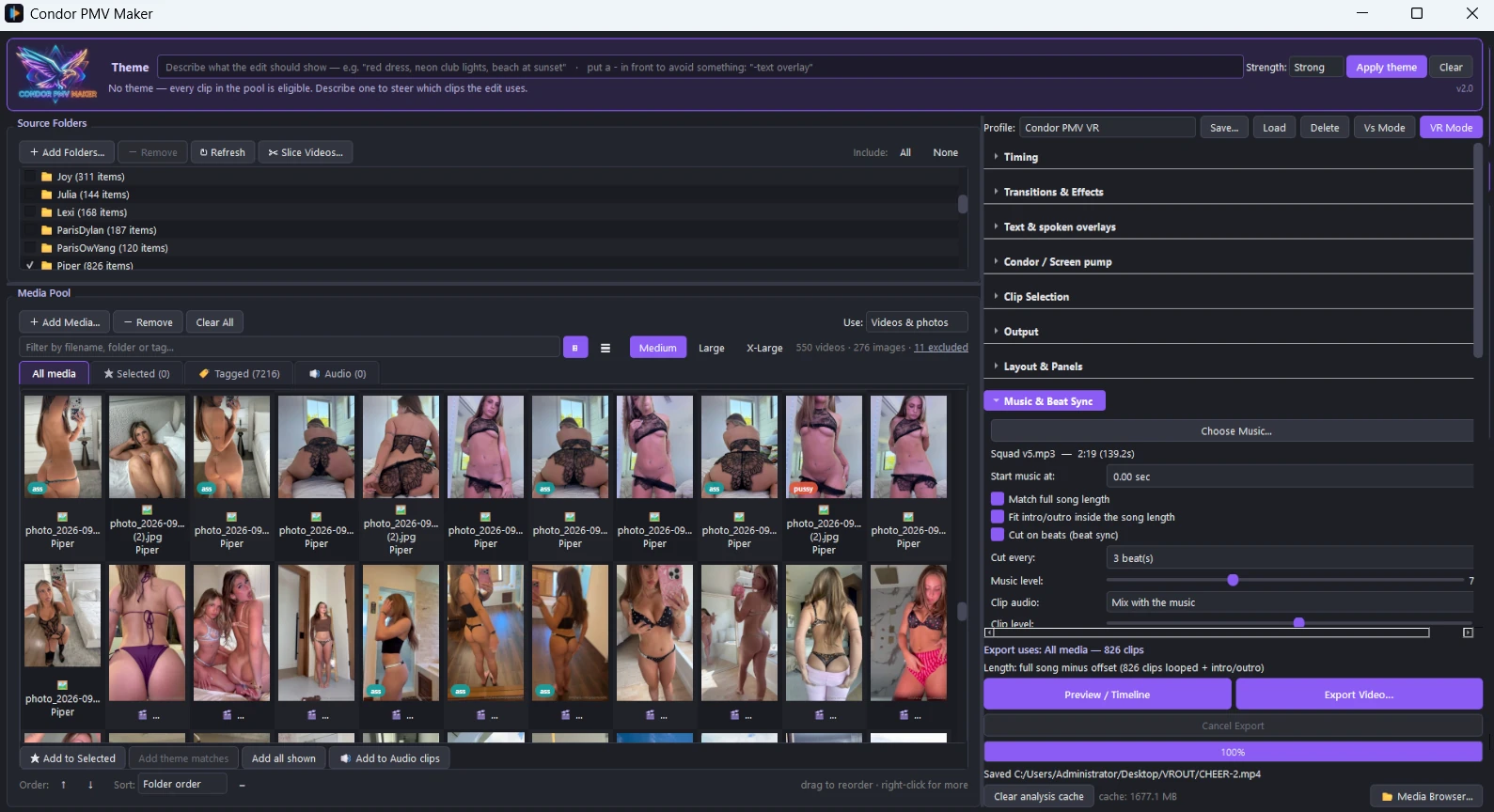
Your folders and media pool on the left, the look of the edit on the right — here set up for a Vs. mode face-off.
How it works
Point it at your footage, give it a track, and it does the edit. You stay in control of every part of it.
Add clips and a song
Add whole folders — subfolders too — or hand-pick clips. Load the track and it finds the beat, the tempo and the song's quiet, building and peak sections.
Set the style
Pick cut length, layouts, transitions, effects and a colour grade — or let it choose to suit each part of the song. Save a style as a profile to reuse.
Review, reroll, export
Preview the planned edit on a timeline, swap any shot you don't like, then export the finished video — and its funscript — in one go.
What's inside
Everything it takes to go from raw clips to a release, in one app.
Cut to the music
Every cut lands on the beat. Quiet parts hold longer and drops cut harder, and the whole edit follows the song's energy from intro to finale.
Smart clip picking
Matches each clip's motion to the moment in the song, uses every clip before repeating, skips black and text screens, and prefers shots with people in them.
Transitions, effects, colour
68 transitions — iris tunnels, collages, pulses, glitches, a nine-panel belt that carries clips across the screen one after another — 68 effects, 12 colour grades, a screen pump that bounces on the beat, and colour matching across clips.
Multi-panel layouts
Single screen, side by side, triptych or a 2×2 grid — or let the layout change with the music, going wide on the drops and back to one screen in the quiet parts.
Paired folders
Pick two folders and every panel pulls from a different one, so what you see side by side is always one from each. Each panel's clip is chosen to go with whatever the panel next to it is playing at that moment — matched, or deliberately contrasted. The lead panel changes hands as the edit runs, so neither folder dominates.
Funscripts that match
A beat-locked stroke script, plus surge, sway, twist, roll and pitch axes, built from the same music as the edit. Pick how hard it works — Gentle through Relentless — and whether the phrasing comes from the beat, from your own pattern library, or from both at once.
Play it on The Handy
Paste your connection key and the device follows the video as you watch it in the app — press play and it starts where you are, pause and it stops, skip and it catches up. It agrees a clock with Handy's server first, because playback is timed against theirs rather than yours. Set how much of the stroke it uses, and re-sync whenever you like.
Text on the beat, spoken or silent
Short lines land on the downbeat, picked to suit the moment. Use the built-in phrases, add your own, or use only your own, and set the colors, opacity, where they sit, and how often they come in.
Your clips' own sound
Hear the clips as well as the track: mix them under the music, or export with nothing but the audio from the clips. Name the clips you want heard in the Audio clips tab and the rest stay silent.
Timeline review
See the whole plan before you render: every cut, clip and transition. Reroll a single shot without touching the rest, then export exactly what you approved.
Your videos, in the app
Everything you've exported in one place, newest first, with its length, size and date — and a marker against the ones that have a funscript beside them. Play them back with sound, filter by name, look into subfolders, and delete a video and its script together when you're done with it.
Tags and a clip library
Tag clips, then build an edit from any mix of tags across all your folders — include some, exclude others. Or hand-pick a pool of favourites.
Fast, safe export
Encodes on your NVIDIA graphics card when you have one, in a single pass. If an export is ever interrupted, what's rendered so far is still a playable file.
Repeatable, or fresh
A random seed makes every export reproducible — same seed, same edit — and one click rolls a new variation when you want a different cut from the same clips.
Spotlight
Vs. mode
Put two folders head to head and let the song stage the fight.
Each side owns sections of the song full-screen, trading rounds.
Drops become face-offs: side by side, split by a pulsing neon laser that swells on the beat.
The laser shoves the losing side off screen when a round changes hands.
A showdown ending trades sides faster and faster, then holds on both.
Blue and orange grading per side, mirrored transitions, and a timeline editor to place every round and face-off by ear.
SIDE A
SIDE B
Spotlight
VR mode
Cut 180° and 360° footage into a VR PMV
Point it at your VR clips and it works out what they are — 180° or 360°, one eye or two, side by side or stacked — from the file itself.
The picture is never reframed. Cutting a sphere is fine; scaling or cropping one moves where things are rather than how they are framed, so it doesn't.
Cuts land on the beat exactly as they do in a flat edit, because the same beat grid and the same clip picking decide them.
30 transitions grouped by how much they move — from a plain crossfade, through wipes, to slides and a zoom — so you choose what suits you.
Six colour grades and a comfort vignette that darkens each eye separately.
The finished file is marked as VR, so a headset opens it as VR rather than a warped flat picture. (Tested on Meta Quest 3.)
The slicer understands VR too: point it at a long film and it returns a pool of short VR clips, each one still marked.
AI tools that run on your computer
Optional, and entirely local: your clips are analysed on your own machine and never uploaded anywhere.
Theme search
Describe what you want — “red dress, neon lights, beach at sunset” — and the edit uses the clips that match best. Put a minus in front of anything to avoid it.
Slicer
Point it at long videos and it cuts them into short clips, sorted and tagged by what's happening in each one — ready to use straight away.
Auto-tag
Tags the clips you already have, using your own words (“gym, mirror, selfie”) or a built-in list, so any folder becomes searchable in minutes.
Voice
Describe the voice you want in plain words — “a breathy young woman speaking close to the mic, low and unhurried” — and it reads your lines in it. Or pick a preset voice, or copy one from a few seconds of audio. Ten languages, generated on your own machine.
Requirements
A normal Windows PC runs it. A graphics card makes it quicker.
You'll need
Windows, 64-bit
About 5 GB of disk space with the AI tools installed, plus room for the models you use
Your own clips and music
Recommended
An NVIDIA graphics card — faster exports and much faster AI tools (it works without one, just slower)
A one-time download the first time you use an AI tool — the clip-tagging model, and a larger one for spoken lines. They're kept outside the app, so reinstalling never fetches them again
Everything else — including the video encoder — comes in the installer
For Handy playback: the device on wi-fi, its connection key from the Handy app, and an internet connection — the device fetches scripts over the web
For VR: your own 180°/360° clips. VR exports are encoded with HEVC, since H.264 on an NVIDIA card can't go past 4096 pixels wide — any recent headset or player handles it
Please only use footage and music you have the right to use. See the Terms of Service.
Want to see what it makes?
Every release in the gallery was cut with Condor PMV Maker.